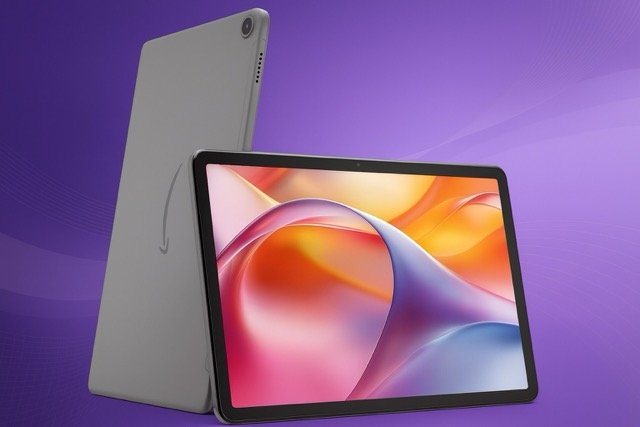

The Amazon Fire Max 11 aims to provide everyday users with a tablet that strikes a balance between strong performance, long battery life, and a competitive price. With its 11-inch high-resolution display, upgraded internal hardware, and durable build, this model is well-suited for streaming, reading, browsing, and light productivity tasks. It is also tightly connected to Amazon’s ecosystem, making it a natural fit for anyone who already uses Kindle, Prime Video, or Audible.
This guide takes you through the tablet’s display quality, performance, battery endurance, software features, and overall value. The goal is to help you decide whether the Fire Max 11 fits smoothly into your daily routine. Everything is explained in a clear and straightforward way to support confident buying decisions.

11″ vivid display with 2.4M pixels (2000 × 1200), low blue light certified
Octa-core processor + 4 GB RAM with Wi-Fi 6 for fast, smooth performance
Thin aluminium design with strengthened glass, 3× more durable than iPad 10.9″ (10th gen)
14-hour battery life with 64/128 GB storage options for movies, music, and apps
Work & play versatility with optional keyboard case, stylus, and Microsoft 365 trial
8 MP camera for clear video calls on Zoom
Family-friendly controls via Amazon Kids and Kids+ subscription for apps, books, and media
Alexa smart home is ready for voice assistance.
Display Quality and Design
The Fire Max 11 includes an 11-inch screen with a 2000 × 1200 resolution. This resolution supports sharp visuals during streaming, browsing, and reading. Indoors, brightness levels feel comfortable, and the screen handles shaded outdoor use reasonably well. Colors appear consistent, and motion feels natural during general navigation. A low-blue-light certification helps reduce eye strain, which benefits anyone who reads or watches videos for long periods.
Amazon replaced the older plastic shell with a more durable aluminium body. This update gives the device a sturdier feel without adding unwanted weight. The slim design makes the tablet easy to hold for extended use, and strengthened glass offers added protection against scratches and small bumps. These improvements help the Fire Max 11 perform well in homes, workplaces, or on the move.
Performance and Hardware
The tablet runs on an octa-core processor supported by 4 GB of RAM. This combination is strong enough for everyday tasks such as browsing, streaming, email, messaging, and light gaming. Apps launch smoothly, and multitasking feels stable. While the tablet is not designed for heavy gaming or intensive professional workloads, its consistent performance suits most casual users.
With 64 GB of internal storage, the Fire Max 11 provides enough room for apps, offline content, and files. For users who need extra space, microSD expansion allows you to store large libraries of photos, videos, and documents. The inclusion of Wi-Fi 6 improves connectivity and reduces lag during streaming or video calls when using compatible routers.
Battery Life and Portability
Battery life is one of the Fire Max 11’s strengths. It offers up to 14 hours of typical use, which supports long sessions of reading, streaming, or browsing without the need to carry a charger everywhere. This endurance works particularly well for travel, school, commuting, or home use.
The tablet’s lightweight build and comfortable proportions make it easy to use on the go. Whether you’re reading in bed, watching content on a train, or working at a café, the design keeps the tablet practical and enjoyable to handle.
Software Experience and Ease of Use
The Fire Max 11 runs Fire OS, Amazon’s customised version of Android. The interface highlights Amazon content and apps, which makes the device convenient for Prime members. Navigation is straightforward, and the layout is designed for users who prefer simplicity over a feature-heavy interface.
The tablet also supports Amazon’s parental control system, allowing families to manage profiles, screen time, and app access. This flexibility means adults and children can use the same device comfortably with tailored settings for each user. Software updates help maintain stability and ensure smooth long-term use.
Camera and Audio Capabilities
The Fire Max 11 includes two 8-megapixel cameras, one at the front and one at the rear. Both cameras support 1080p video. The front camera performs well for video calls and meetings, while the rear camera works effectively for casual photos and document scanning. While these cameras will not replace your smartphone, they offer reliable performance for everyday tasks.
Stereo speakers with Dolby Atmos support offer clearer audio and a more immersive experience during films, podcasts, or music. The speakers perform well for indoor use and maintain clarity even at higher volume levels.
Productivity and Accessory Support
Amazon offers optional accessories that help transform the Fire Max 11 into a light productivity device. The keyboard attaches magnetically and supports comfortable typing for emails and documents. A stylus can be used for drawing, handwriting, or marking up files. These accessories make the tablet more versatile, especially for students or remote workers.
The built-in fingerprint sensor adds convenience by simplifying unlocking and app login processes. Together, these features support a smooth workflow for users who need a device that handles both entertainment and light productivity tasks.


Comparison: Fire Max 11 vs Galaxy Tab A9+ vs Lenovo Tab Plus
| Feature / Spec | Amazon Fire Max 11 | Samsung Galaxy Tab A9+ | Lenovo Tab Plus |
|---|---|---|---|
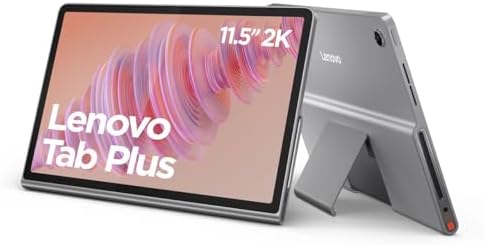
| Display size & resolution | 11″ — 2000 × 1200 px | ≈ 11″ — 1920 × 1200 px | 11.5″ — 2000 × 1200 px, 90 Hz |
| Refresh rate | ~60 Hz (standard) | 90 Hz (smoother motion) | 90 Hz (smoother motion) |
| RAM / Storage (base) | 4 GB RAM / 64 GB storage, expandable via microSD | 4 GB (or more variants) / 64 GB, expandable to 1 TB | 8 GB RAM / 128 GB (or more), expandable |
| Battery & endurance | Up to ~14 hours runtime (streaming, browsing) | Similar mid-range battery life (good for daily tasks) | Mid-range battery life — balance of performance and endurance |
| Operating system / Ecosystem | Fire OS — deep integration with Amazon services, but limited native Google Play support by default | Standard Android — access to Google Play and full Android ecosystem (usually preferred for apps) | Standard Android — similar advantages (flexibility, full app ecosystem) |
| Build / Extras | Aluminium body, fingerprint sensor (power button), optional stylus/keyboard | Sleek metal finish, solid build, good for basic tasks and streaming | 11.5″ larger screen, 90 Hz display, better RAM/storage, suitable for heavier multitasking or media consumption |
| Best use-case (in my view based on specs) | Media streaming, reading, casual use, Amazon services users, budget-conscious buyers | Balanced Android tablet use: apps, browsing, light work, streaming, flexible ecosystem | More performance headroom: media, multitasking, longer-term use, heavier workloads |

✅ Best Use Cases for Each Tablet
- Amazon Fire Max 11 — Ideal for those seeking an affordable, dependable tablet for streaming, reading, and web browsing. It integrates smoothly with Amazon services like Prime Video and Kindle, and its aluminium body with fingerprint unlock adds a premium touch at a budget-friendly price.
- Samsung Galaxy Tab A9+ — A great choice if you prefer a pure Android experience with full access to Google Play apps. The 90 Hz display and expandable storage make it well-suited for everyday tasks, casual gaming, and light productivity.
- Lenovo Tab Plus — Recommended for users who need extra performance and storage for multitasking, media consumption, or long-term use. With a 90 Hz screen and higher RAM, it’s built to handle heavier workloads and stay responsive over time.
Overall Value and Who It Suits
The Fire Max 11 offers balanced performance for its price, making it a strong choice in the mid-range tablet category. It suits users who want a device for streaming, reading, browsing, or simple productivity tasks. Its long battery life, durable build, and tight integration with Amazon services make it ideal for families, casual users, and anyone who appreciates a reliable and budget-friendly tablet.
It may not meet the needs of users who rely heavily on Google Play apps, require high-end performance, or want advanced creative tools. However, for general daily use, the Fire Max 11 provides dependable quality and strong value.
FAQs
Is the Amazon Fire Max 11 good for students?
Yes, its long battery life, lightweight design, and compatibility with optional accessories make it suitable for study sessions, note-taking, and online classes.
Can the Amazon Fire Max 11 access Google Play?
Fire OS does not include Google Play by default. Some users install it manually, but it is not officially supported.
Does the Fire Max 11 support multitasking?
Yes, the octa-core processor and 4 GB of RAM allow smooth switching between apps for everyday multitasking needs.
Is this tablet suitable for children?
Yes, Amazon’s parental controls and multi-profile options make it family-friendly.
Can you use the Fire Max 11 for work tasks?
It works well for light productivity tasks such as email, document editing, and video calls, especially when paired with the optional keyboard.
How does the Fire Max 11 perform for streaming?
It handles streaming smoothly thanks to its high-resolution display and Wi-Fi 6 support.
Does the tablet support expandable storage?
Yes, it includes a microSD slot that allows significant storage expansion for files, videos, and apps.