
You’re probably here because you need a laptop that actually helps you get things done—without draining your bank account. Maybe you’re juggling lecture notes and online seminars, working from home on a tight budget, or replacing an ageing device that groans every time you open a browser tab. The truth is, buying a cheap laptop can feel risky: will the keyboard be comfortable, will video calls stutter, will the battery give up halfway through a meeting?
Let’s address that head-on. A well-chosen budget laptop can be a reliable companion for everyday life—writing essays, running spreadsheets, joining Teams or Zoom calls, streaming, and a bit of light photo work. The trick is understanding which specs truly matter, where the compromises are acceptable, and how to pick models that balance power, portability, and longevity. In this cheap laptop review, I’ll walk you through five carefully selected laptops commonly available on Amazon.co.uk, explain their strengths and caveats in plain English, and show you how to choose confidently—no fluff, no hard sell.
By the end, you’ll know exactly which budget device suits your routine, how to avoid common pitfalls, and where each model shines in real-world use.
Top 5 Cheap Laptops That Deliver Big Performance
Availability and specs vary by seller; many listings offer multiple RAM/SSD configurations under the same product page.
ASUS Vivobook 15 (X1504VA, Intel Core i3‑1315U, 8GB RAM, 512GB SSD)
This is the budget sweet spot for many people. The Vivobook 15 feels reassuring from the moment you start typing—keys are crisp and well spaced, the deck doesn’t flex under pressure, and the 15.6″ Full HD anti‑glare panel is easy on the eyes for long sessions.
Every day performance is lively: Windows wakes quickly, apps open without fuss, and switching between a browser full of tabs, Office/Docs, and Spotify doesn’t provoke stutters. It’s not a gaming machine, but for the real world—Teams/Zoom, spreadsheets, writing, streaming—it’s exactly the dependable behaviour you want from a best budget laptop UK buyers can rely on.
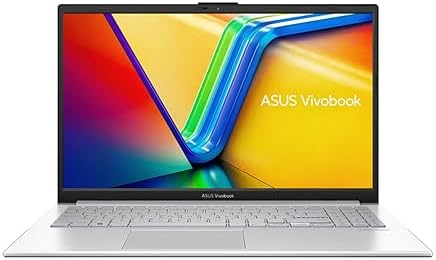
- Processor : Intel Core i3-1315U Processor 1.2 GHz (10MB Cache, up to 4.5 GHz, 6 cores, 8 Threads)
- Display : 15.6-inch, FHD (1920 x 1080) 16:9 aspect ratio, LED Backlit, 60Hz refresh rate, 250nits, 45% NTSC color gamut,…
- Internal Memory : 8GB DDR4 on board
- Total storage capacity: 512 GB SSD
- Operating System : Windows 11 Home
Who It’s Best For
Students and home users who want a balanced, no‑nonsense machine for writing, research, video calls and streaming.
HP 15s (15s‑fq5021xx family, Intel Core i5‑1235U, 8GB RAM, 256–512GB SSD)
If you want more pep than an i3 without jumping into premium territory, the HP 15s with Intel’s 12th‑gen i5‑1235U is a sensible step up. In use, the extra headroom is immediately apparent: large spreadsheets scroll smoothly, large PDFs don’t feel sluggish, and switching between multiple browser profiles and office apps remains comfortable.
The micro-edge FHD display is crisp, and the chassis is slim enough to carry all day long. The battery is suitable for mixed workloads, although heavy multitasking will still require you to reach for the charger by the afternoon.
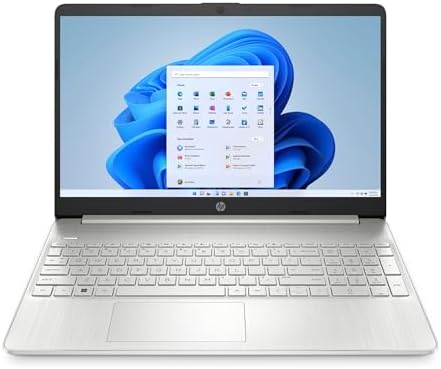
15.6″ Full HD display
Intel Core i5‑1235U (10‑core hybrid)
8GB DDR4 RAM
256GB SSD
Windows 11 Home
Who It’s Best For
Students and professionals who need affordable laptops for work with a bit more power for multitasking, light data work, and regular video calls.
Lenovo IdeaPad 3 15 (i3‑1115G4, 8GB RAM, 512GB SSD; some SKUs with touchscreen)
Lenovo’s IdeaPad keyboards are consistently good, and this model keeps that tradition. If you type a lot—such as essays, emails, and reports—the key feels like it reduces fatigue. With 8GB RAM and a 512GB SSD, it’s clearly more forgiving than the 4GB/128GB machines you might be tempted by for price alone.
Some configurations add a touchscreen, which is handy for annotating PDFs or quick navigation. The styling is understated, the chassis is practical rather than flashy, and it behaves like a sensible everyday workhorse.

- 8GB RAM | 512GB SSD
- Equipped With The Most Powerful and Fast 11th Gen Intel Dual-Core i3-1115G4 Processor
- 15.6 FHD (1920 x 1080) IPS Anti-glare Touchscreen, Integrated Intel UHD Graphics
- 1 x USB-A 3.2, 1 x USB-C 3.2, 1 x USB-A 2.0, 1 x HDMI 1.4b, 1 x SD Card Reader
- Microsoft Windows 11 Home in S mode, 720p HD Privacy Webcam, Dolby Audio, Rapid Charge, Bluetooth 5.1
Who It’s Best For
Students and office workers who want a reliable laptops experience without sacrificing storage or everyday smoothness.
Acer Aspire 3 A315‑44P (AMD Ryzen 5 5500U, 16GB RAM, 512GB SSD)
You’ll feel the difference with Ryzen 5—apps open faster, switching between heavy browser sessions and productivity software is smoother, and tasks that used to hiccup on entry‑level chips settle down. The Aspire 3’s FHD IPS display has good clarity for spreadsheets and streaming, and the 16GB of RAM on this SKU gives generous headroom for multitasking.
It’s not a premium ultrabook, but as a best performance pick in the budget zone, it’s a strong value play for anyone who regularly juggles lots of tabs, data, and light creative work.

15.6″ Full HD IPS display
AMD Ryzen 5 5500U
16GB RAM
512GB SSD
Windows 11 Home
Who It’s Best For
Home workers, teachers, and students handling larger documents, browser‑heavy research, and occasional media tasks who still want affordable laptops for work.
ASUS Chromebook CX1 (CX1400 series, Intel Celeron N4020, 4GB RAM, 64GB eMMC)
If your life is entirely browser-based, a Chromebook can be the most straightforward solution. The ASUS Chromebook CX1 boots in seconds, updates silently, and keeps you focused on web apps, including Google Workspace, web-based Office, Canva, YouTube, and cloud storage.
The 15.6″ Full HD screen is a welcome upgrade from the low-res panels often found at this price, and the lightweight design makes it easy to carry. Offline limitations exist, but if you’re comfortable living in the cloud, this is the best ultra‑budget pick that still feels modern-day-to-day.

- Celeron Processor N4500 (4M Cache, up to 2.80 GHz)
- 4GB LPDDR4 RAM
- 64GB eMMC
- Display: 15.6-inch, HD (1366 x 768) 16:9, Anti-glare display, LED Backlit, 220nits, NTSC: 45%
- Chrome OS
- Connectivity technology: Bluetooth
- Wireless communication technology: Bluetooth
- wireless_comm_standard : 802_11_AGNAC
Who It’s Best For
Casual users, pupils and anyone whose workflow lives in the browser—ideal for web research, essays, email, and streaming.
Comparison Table
What to Look for When Purchasing a Cheap Laptop
1) The specs that genuinely matter
- Processor: For Windows, aim for Intel Core i3 or AMD Ryzen 3 as a practical baseline. Stepping up to a Core i5 or Ryzen 5 noticeably improves responsiveness when juggling multiple apps. (See the i3/i5 and Ryzen listings above for typical configurations.)
- RAM: 8GB is the everyday sweet spot; 16GB is ideal if you routinely multitask heavily (Acer Aspire 3 SKU is a good example).
- Storage: Choose SSD (never a spinning HDD). 256GB is workable if you rely on cloud storage; 512GB provides sufficient space for local files and media (Vivobook/Lenovo SKUs typically feature 512GB configurations).
- Display: Prioritise Full HD (1920×1080); IPS panels offer better viewing angles. Anti‑glare finishes reduce reflections (Vivobook and Aspire 3 listings highlight these details).
- Battery & Charging: Treat advertised figures as optimistic; fast‑charge features on HP help top‑up between lectures or meetings.
2) Entry‑level vs premium budget
- Entry‑level: Celeron/Athlon with 4GB RAM, small SSD/eMMC—fine for very simple tasks. Chromebooks like the ASUS CX1excel here if you live in web apps.
- Mid budget: i3/Ryzen 3 with 8GB RAM, 256–512GB SSD—this suits most people (e.g., Vivobook 15, IdeaPad 3).
- Upper budget (still “affordable”): i5/Ryzen 5 and/or 16GB RAM for smoother multitasking and more demanding office workflows (e.g., HP 15s, Aspire 3).
3) Common mistakes to avoid
- Chasing the lowest price while ignoring RAM/SSD: A rock‑bottom spec can feel sluggish daily—even for “basic” users.
- Overlooking keyboard comfort: If you type a lot, prioritise a good keyboard (Lenovo is strong here).
- Misjudging storage needs: Media and offline files grow; a 512GB SSD (Vivobook/Lenovo) prevents the need for constant juggling.
- Forgetting cloud workflows: On smaller storage or Chromebooks, lean into Google Drive/OneDrive; it keeps devices fast and clutter‑free.
4) UK‑specific considerations
- UK keyboard layout: Confirm the UK variant on the listing—Amazon pages for these families typically show UK models/keys.
- Warranty & returns: Buying through Amazon.co.uk streamlines returns/warranty handling across third‑party sellers and Amazon Renewed (where applicable).
- Delivery & stock timing: Popular SKUs (HP/Acer/ASUS/LENOVO) fluctuate in stock; use the same product page to choose alternative configurations when one is out.
Final Verdict
The right cheap laptop should fade into the background—it should enable your work, study and life without constant fiddling. From this line‑up:
- Best Overall Budget: ASUS Vivobook 15 (X1504VA) — balanced performance, comfortable typing, and a roomy SSD for local files.
- Best Mid‑Range Pick: HP 15s (fq5021 family) — the 12th‑gen i5 makes daily multitasking noticeably smoother without premium pricing.
- Best Value Choice: Lenovo IdeaPad 3 15 — sensible spec and strong keyboard comfort; the touchscreen for PDF notes and quick navigation.
- Best Performance Budget: Acer Aspire 3 A315-44P — Ryzen 5 and 16GB RAM provide ample headroom for demanding everyday workflows.
- Best Ultra‑Budget (Cloud‑first): ASUS Chromebook CX1 — minimal maintenance, fast boot, and a Full HD screen at a low price if your life is in the browser.
Frequently Asked Questions
What’s the best budget laptop for everyday use?
If you want balanced performance without overspending, the ASUS Vivobook 15 (X1504VA) is a safe, well-rounded choice—featuring a Full HD screen, modern i3 CPU, 8GB RAM, and a spacious 512GB SSD.
Are laptops under £500 good for students?
Yes, especially models around the i3/Ryzen 3 mark with 8GB RAM and an SSD. The Lenovo IdeaPad 3 configuration above hits that practical sweet spot; prices fluctuate, so check current deals.
Can a cheap laptop handle Zoom and Teams?
Absolutely. Even i3/Ryzen 3 devices manage video calls fine if you keep background apps sensible. The HP 15s with i5 is smoother when juggling multiple apps and screens simultaneously.
Is 4GB RAM enough today?
It works well for very light use (or Chromebooks that live in the cloud). For Windows, 8GB RAM is the practical baseline for comfortable multitasking.
How much storage do I need?
256GB SSD is okay if you rely on cloud storage; 512GB SSD is ideal if you keep files locally, as in the Vivobook and many IdeaPad 3 configurations.
Which is better: Chromebook or cheap Windows laptop?
Choose a Chromebook if your work is web‑first and you want simplicity. Choose Windows if you rely on desktop apps and broader software support. The ASUS CX1 represents the Chromebook approach well; the Vivobook/HP/Lenovo/Acer cover Windows tiers.
How long do budget laptops last?
With sensible care, 3–5 years is common. Keep Windows updated, avoid installing junk, and use cloud storage to lighten local load. (Applies similarly to Chromebooks, which handle updates silently.)
Are cheap laptops good for basic photo editing?
Light editing is fine on i3/Ryzen 3 machines with 8GB RAM; if you work with heavier workloads, an i5/Ryzen 5 device, such as the Acer Aspire 3 , will feel more responsive.
What if my chosen model is out of stock?
Use the same listing page to select a close configuration (e.g., 256GB vs 512GB SSD) or another seller. HP and Acer families often have multiple SKUs live at once.